
Imagine scanning through 5,000 stocks on your own every evening, charting each one, checking price levels, and comparing performance. That is exactly what most retail traders attempt, and most fall short. StockEdge Price Scans exist to solve this very problem.
Rather than manually sifting through the market, Price Scans apply rule-based filters across every listed stock on BSE and NSE simultaneously. By the time markets close each evening, a refined list of candidates lands on your screen, stocks that actually match your strategy, not a random wishlist built on gut feel.
In this blog, we will discuss how to use StockEdge Price Scans to identify trading opportunities using rule-based filters, understand the different categories of scans and learn how these scans can help traders filter stocks based on price action, momentum, and market behavior.
What are Price Scans in StockEdge?
Price Scans are pre-built, quantitative filters that search the entire Indian equity market based on specific price-action conditions. Each scan has a clearly defined logic: a stock either meets the criteria, or it does not. There is no subjectivity, no guesswork.
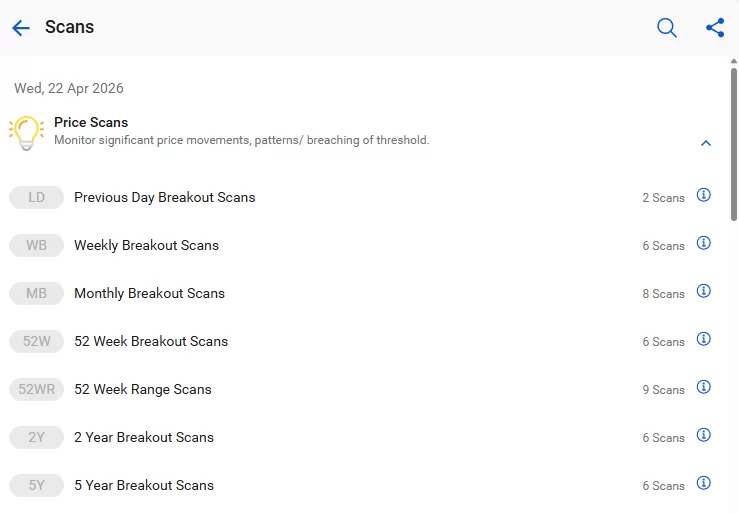
These scans run every night after the market closes and pull from end-of-day (EOD) data across BSE and NSE. The next morning, traders have a ready-made watchlist built on objective, data-driven criteria. Think of it as automating the most time-consuming part of technical analysis.
How to Use Price Scans in StockEdge?
Using Price Scans in StockEdge is a powerful way to filter through thousands of stocks to find those exhibiting specific price momentum or patterns. Since “Price is Supreme” (often called Bhav Bhagwan Che in Indian markets), these scans help you identify opportunities before they become obvious to everyone. For stronger conviction, combine with other StockEdge Scans, like Fundamental Scans and Technical Scans.
Here is a step-by-step guide on how to navigate and utilize Price Scans effectively.
To get started, follow these navigational steps on either the StockEdge mobile app or web platform:
- Open the App/Website and go to the “Analytics” tab on the bottom or side menu.
- Select “Scans” from the analytics dashboard.
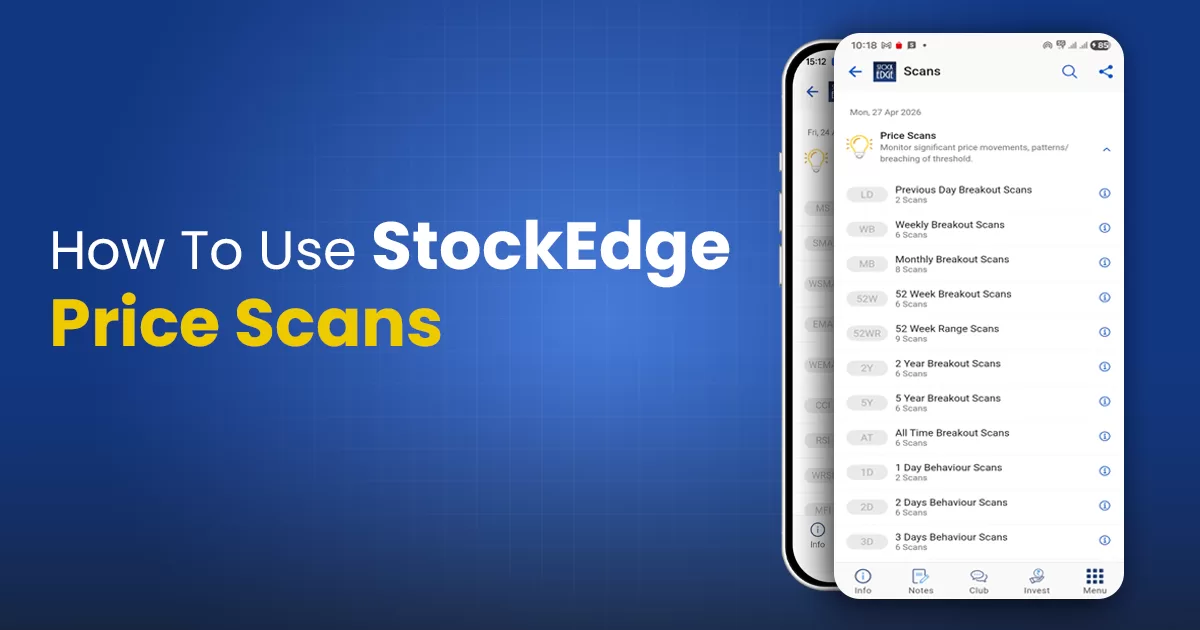
- Click on “Price Scans” (it is usually the first category listed).
Suggested Read: How to Use StockEdge Candlestick Scans
Different Price Scans by StockEdge
StockEdge organises Price Scans into six distinct families. Each targets a different dimension of price behaviour, and each is suited to a specific trading style or market condition. Here is a quick overview before the detailed breakdown:
| Category | What it Identifies | Best For |
| Breakout Scans | Stocks crossing previous highs (Daily, Weekly, Monthly, or 52-Week). | Trend following and momentum trading. |
| Price Behavior | Specific 1-day, 2-day, or 3-day movements (e.g., “Rising for 3 days”). | Short-term swing trading. |
| 52-Week Range | Stocks near their 52-week high or low. | Identifying long-term support/resistance levels. |
| Relative Strength | Stocks outperforming the benchmark index (Nifty 50). | Finding “Leader” stocks in a bull market. |
| VWAP Scans | Price crossing the Volume Weighted Average Price. | Intraday and short-term entry points. |
Let’s understand the breakout scans
Breakout Scans
This scan filters out the stocks that cross previous highs (Daily, Weekly, Monthly, or 52-Week).
When a stock has been bouncing off a price level for weeks or months and finally clears it decisively, something has shifted. Sellers who once stepped in at that level are no longer there in sufficient numbers. Buyers are in control, and the path of least resistance has changed direction.
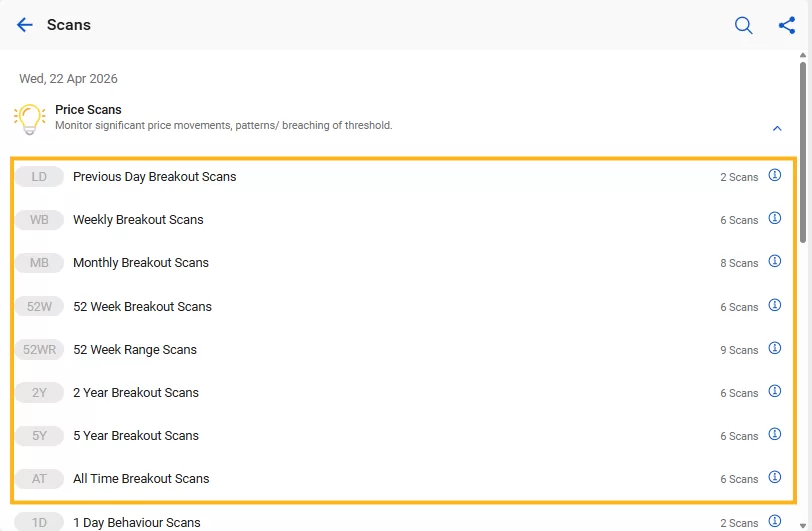
- Previous Day Breakout Scans: Identifies stocks that break above or below the previous day’s key price levels.
- Weekly Breakout Scans: Shows stocks breaking out from weekly highs/lows or key weekly ranges.
- Monthly Breakout Scans: Tracks stocks breaking out of monthly price levels, signaling potentially stronger trends.
- 52 Week Breakout Scans: Finds stocks crossing their 52-week high or low, often watched for momentum opportunities.
- 52 Week Range Scans: Identifies stocks trading near the upper or lower end of their 52-week range.
- 2 Year Breakout Scans: Captures stocks breaking important price levels formed over the last two years.
- 5 Year Breakout Scans: Highlights major breakouts above or below levels built over five years, often indicating long-term structural moves.
- All Time Breakout Scans: Shows stocks crossing all-time highs or lows, which may indicate significant trend continuation or major reversals.
Behaviour Scans
Behavior Scans in StockEdge track the persistence of price movement over 1, 2, or 3 days. They are designed to identify stocks where the “crowd” is acting in a consistent way, signaling strong underlying momentum or a potential reversal.
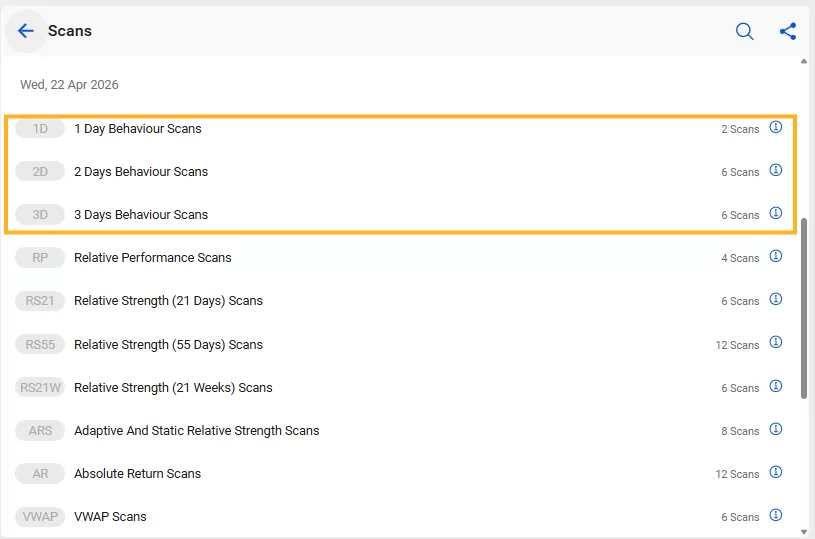
StockEdge divides these into three specific timeframes:
- 1-Day Behavior Scans: These scans enable you to filter stocks based on the previous day’s high/low price.
- 2-Day Behavior Scans: These scans enable you to filter stocks based on the last 2-day price points.
- 3-Day Behavior Scans: These scans enable you to filter stocks based on the last 3-day price points.
Why Use Behavior Scans Instead of Breakouts?
Breakouts can sometimes be “fakeouts” (where price touches a high and immediately drops). Behavior scans help filter for quality:
- Consistency: A stock closing in the upper 25% of its range for 2 days is often more reliable than a stock that spiked 10% in one hour and then cooled off.
- Early Entry: You can often find a stock in a “2-Day Higher High” scan before it appears in a “Weekly Breakout” scan.
- Institutional Footprints: Big funds usually buy over several days. “Rising for 3 days” with increasing volume is a classic footprint of institutional accumulation.
Relative Strength Scans
These scans enable you to identify companies that have outperformed or underperformed the Benchmark Index, like Nifty or Sensex, or Sectoral Index, like Realty, Banking, Auto, etc
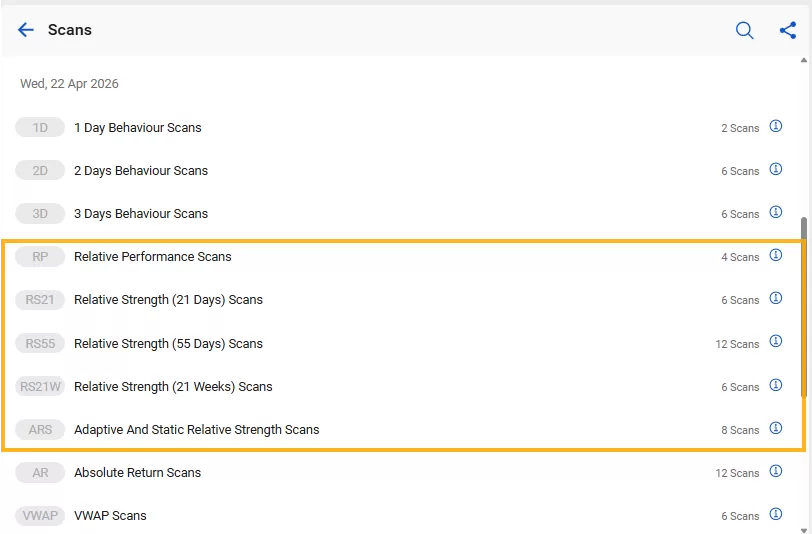
StockEdge divides these into 5 categories based on relative performance against benchmark and sectoral indices based on the time period.
- Relative Performance Scans compare a stock’s returns against a benchmark or sectoral index to identify whether it is outperforming or underperforming the broader market or its peers. These scans help spot market leaders and laggards based on comparative performance over defined time periods.
- Relative Strength (21 Days) Scans measure a stock’s performance relative to others over the last 21 trading sessions, helping identify short-term momentum and stocks showing recent leadership. These scans are often useful for finding emerging strength.
- Relative Strength (55 Days) Scans evaluate a stock’s relative strength over 55 trading sessions, offering a medium-term view of momentum. These scans help identify stocks where strength appears more sustained and may indicate developing trends.
- Relative Strength (21 Weeks) Scans track relative strength over a much longer period of 21 weeks, helping identify stocks that have maintained consistent leadership over time. These scans are useful for spotting structurally strong stocks.
- Adaptive and Static Relative Strength Scans measure strength using two different approaches. Adaptive relative strength adjusts to changing market conditions and evolving momentum, while static relative strength uses fixed criteria to provide a more stable, rule-based measure of sustained strength.
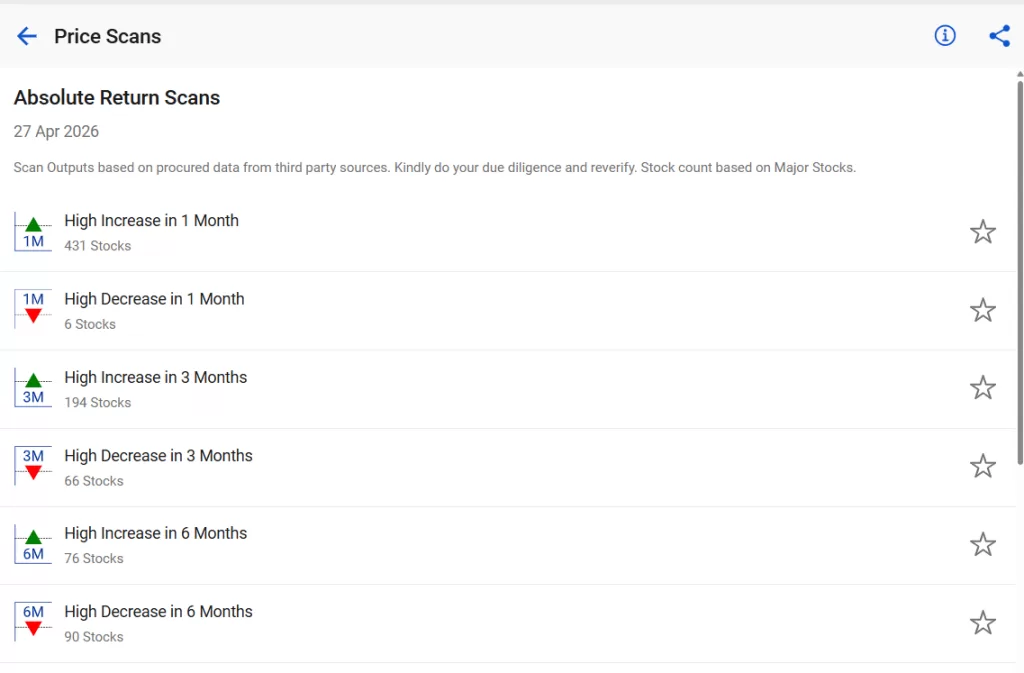
Absolute Return Scans
It measures a stock’s price appreciation or depreciation over specific time frames, located under price scans to gauge market sentiment. These scans show percentage gains or losses, independent of benchmarks, helping identify assets with high momentum.
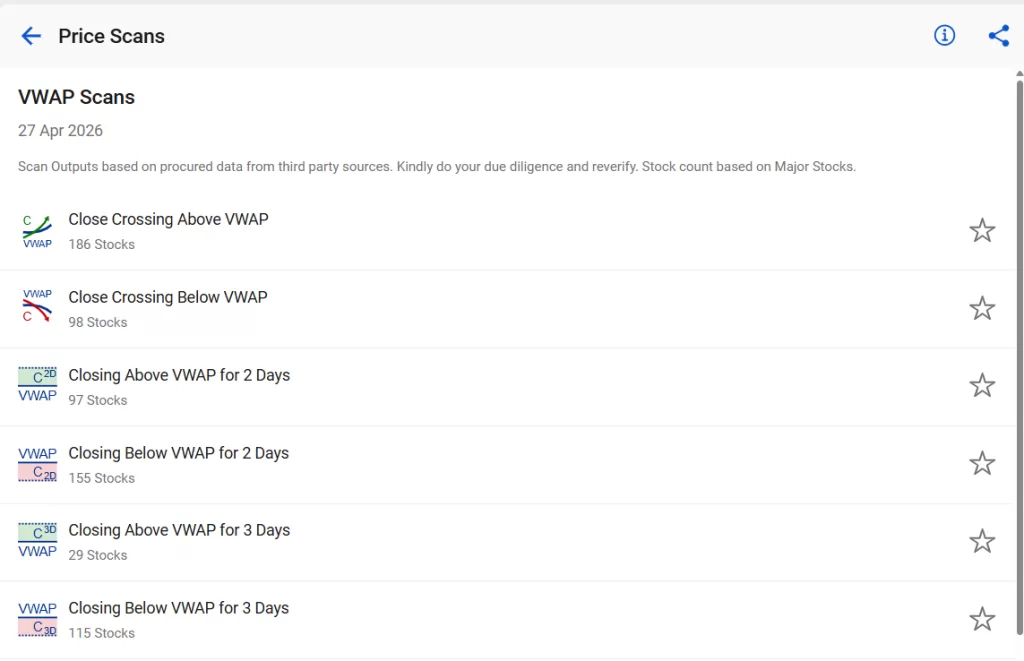
VWAP Scans
StockEdge offers dedicated VWAP (Volume Weighted Average Price) scans under its technical analysis tools to help traders identify intraday, swing, and positional trends. It identifies stocks trading above/below the volume-weighted average, signalling potential bullish or bearish
Also, Read Our Blog – How to Use Adaptive & Static Relative Strength Scans
Conclusion
StockEdge Price Scans replace noise with clarity, gut feel with rules, and chaos with structure. They do not tell you what to buy; they tell you where to look and that alone is a massive advantage.
But remember, a scan is a signal, not a decision. The traders who win are not the ones who find stocks first, but the ones who validate them better. Combine scans with volume, trend, and context, and you shift from reacting to the market to anticipating it.
What we are covering next: How To Use StockEdge Volume & Delivery Scans
Frequently Asked Questions (FAQs)
1. How often are StockEdge price scans updated?
StockEdge price scans are always updated at the end of the day.
2. Can I combine multiple price scans in StockEdge to filter stocks more precisely?
Yes, you can use the customs scans or combo scans features.
3. Are StockEdge price scans suitable for intraday traders or only positional traders?
Price Scans are primarily built for positional and swing traders.
4. How do I avoid false signals when using price scans?
Never act on a scan result in isolation. At a minimum, cross-check three factors before entering a position: volume confirmation, momentum, and trend
5. Can price scans be used for mutual fund or ETF selection?
StockEdge Price Scans are designed for individual equities listed on BSE and NSE and do not directly scan mutual fund NAVs or ETF prices.